Short answer: if you want a voiceover file you can download and actually use in a commercial project without paying or signing up, FreeTextoSpeech is the one I'd reach for. ElevenLabs is the place to go for premium expressive voices and cloning if you have the budget. Speechify is a read-aloud app, better for listening than for making audio. Below is the honest comparison, from someone who built one of the three.
I'm Bipul Kumar, and I made FreeTextoSpeech. So yes, I have a horse in this race, but I'll try to be fair, because these three tools get lumped together far more than they should. They do different jobs. One generates audio you own, one is a premium studio, and one reads text to you. Once you figure out which of those you actually need, the choice usually makes itself. Let me walk through it.

What each one is really for
- FreeTextoSpeech - free voiceover you can download and use commercially. There's an in-browser engine that keeps working offline once the model loads. I built it for creators and anyone who just wants an audio file without hitting a wall.
- ElevenLabs - the most expressive premium voices out there, plus voice cloning. Aimed at people who need top quality and will pay for it.
- Speechify - a reading app. Good for getting through documents, articles, and books hands-free, especially on your phone.
Only one of these hands you a file you own outright. If you've ever picked a tool from its slick homepage and then hit a paywall right at the download button, you know why that distinction matters. So ask yourself one thing first: am I making audio, or listening to audio? Answer that and the shortlist sorts itself out.
Side by side
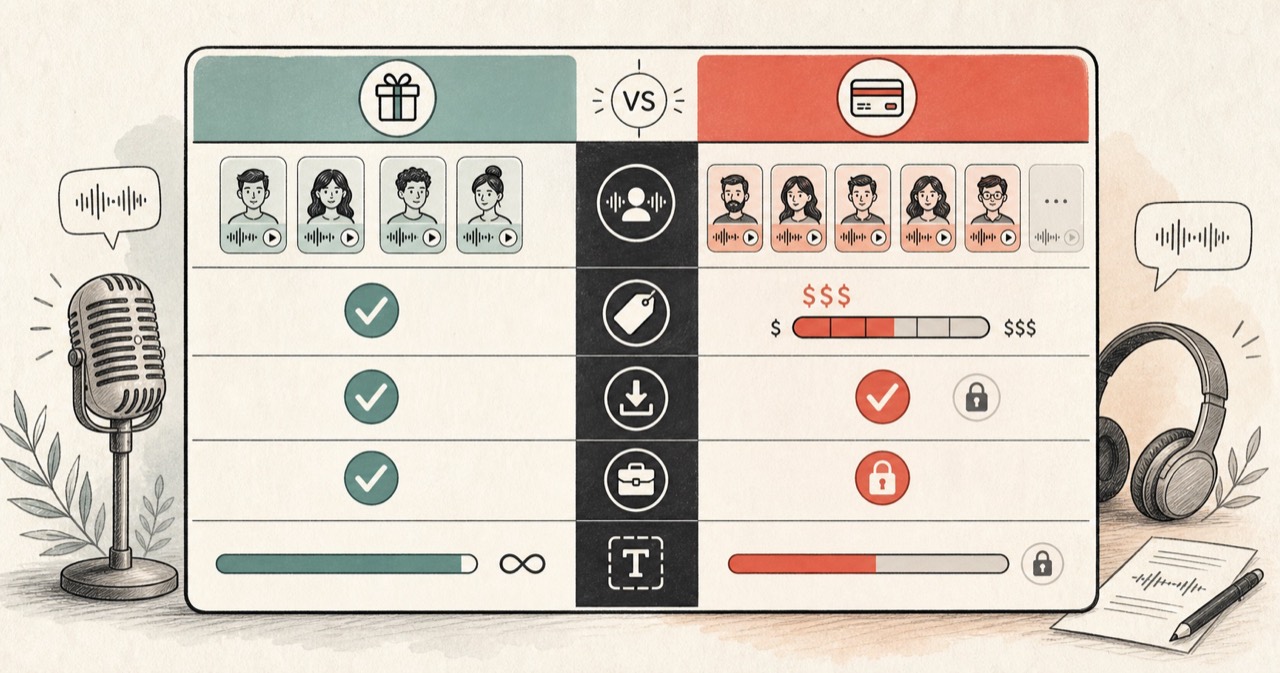
| Feature | FreeTextoSpeech | ElevenLabs | Speechify |
|---|---|---|---|
| Genuinely free tier | Yes, generous | Limited | Limited |
| Signup required | No, for basic use | Yes | Yes |
| Commercial use on free tier | Yes, no attribution | Restricted | Restricted |
| Download audio file | Yes, MP3 or WAV | Yes | Limited on free |
| Voice cloning | No | Yes | Yes, paid |
| Languages | 9 | Many | Many |
| Best for | Free voiceover | Premium voices | Reading aloud |

You can read the full breakdowns on our ElevenLabs and Speechify alternative pages.
Where FreeTextoSpeech wins
The free tier is basically the whole pitch. You get 54 neural voices across 9 languages, running on the open Kokoro model, 5,000 characters per request, commercial use with no attribution, and downloads as MP3 or WAV. No account needed. That 5,000 characters works out to roughly a thousand words of script in one go, which is plenty for most short videos, ads, and narration segments. The thing I was tired of with other free tiers is that the good voices are locked, the output has a watermark, or the license quietly forbids you from making money off it. I wanted to remove all of that.
The languages aren't there to pad a marketing page. You get US English, UK English, Spanish, French, Hindi, Italian, Japanese, Brazilian Portuguese, and Mandarin Chinese, each with named voices you actually pick from. On US English alone there's Heart, Bella, Sarah, Jessica, Kore, Nicole, Nova, River, and Sky on the female side, and Adam, Michael, Onyx, Fenrir, Liam, Eric, and Puck on the male side. UK English adds Emma, Lily, George, Daniel, and Lewis. Hindi has Alpha, Beta, Omega, and Psi. There's a speed slider from 0.25x to 4.0x, so you can slow a voice down for clarity or push it faster for a snappier read.
The in-browser engine is the part I'm most proud of. It runs on your own device and keeps working offline after a one-time model download, and in that mode it takes up to 50,000 characters per request. Anonymous use covers 5,000 characters per request and 25,000 cloud characters every 30 days. Sign in and that jumps to 500,000 characters every 30 days. Nothing here sits behind a "contact sales" form.
Where ElevenLabs wins
ElevenLabs is where I'd send you when you need the most expressive, human-sounding read, or when you want to clone a voice, and you're happy to pay for it. Its emotional range is genuinely strong. For an audiobook, character work, or a brand voice where a subtle performance is the whole point, that quality earns its keep. The catch is a limited free tier and commercial restrictions until you subscribe, so it makes the most sense on high-end projects rather than quick everyday jobs. If you're producing something that matters and the budget is there, it's a fair choice. I'm not going to pretend otherwise.
Where Speechify wins
Speechify is for listening, not producing. It's a reading and productivity app, and it's good at that, especially on a phone. It'll read a PDF, a web page, or your email out loud while you do something else. That's real value for accessibility and for people who take information in better by ear. My mother is one of those people, honestly, so I get the appeal. If your goal is to consume text rather than export a clean file for an editing timeline, this is built for you. Just know its free tier limits the better voices and downloads.
A quick worked example
Say you're making a 60 second product explainer for YouTube. You've got maybe 150 words of script and you want a clean US male narrator to drop into your editor. Here's how the three stack up on that one job.
- FreeTextoSpeech - paste the script, pick a voice like Adam or Michael, nudge the speed slider if it needs it, generate, download the MP3 or WAV. No account, no cost, and you can publish and monetise the video. A minute or two, start to finish.
- ElevenLabs - you'd get a polished read, but you need an account, and on the free tier the commercial rights and download allowance are tight, so a published, monetised video probably means a paid plan.
- Speechify - wrong tool for this. It's built to read the script to you, not to hand you a file for editing.
For a short clip you're going to publish, the free generator is the fastest way to a usable file. Save the premium studio for the projects that genuinely need it.
Common mistakes when choosing
- Confusing "free to try" with "free to use commercially" - a tool can have a free tier and still forbid you from monetising what comes out of it. Read the license before you build a business on top of it. FreeTextoSpeech allows commercial use with no attribution.
- Picking on voice quality alone - the most expressive voice in the world does you no good if you can't download it, can't use it in your project, or hit a monthly cap on day one. Weigh the rights and limits alongside the sound.
- Downloading the wrong format for the job - FreeTextoSpeech downloads MP3 by default, which is small and plays anywhere. If the audio is going onto an editing timeline, pick WAV (24 kHz, lossless) in the format menu next to Download so it edits cleanly.
- Reaching for SSML - you don't need it here. The tool takes plain text only. You shape the delivery with punctuation, spelling, and the speed slider, which honestly covers most of what SSML would have done anyway.
- Using a reading app to make voiceover - Speechify reads to you beautifully, but it's not for exporting a clean file to edit. Match the tool to the job.
Tips for getting a natural read
Since there's no SSML to fuss with on FreeTextoSpeech, the controls are pretty plain. A few small habits do most of the work:
- Punctuate for pauses - commas give short breaths, full stops give longer ones. Split a long sentence into two and the pacing sorts itself out.
- Spell out tricky bits - write "twenty twenty six" or "F A Q" when you want a specific pronunciation. Spelling is your main lever for how a word lands.
- Use the speed slider on purpose - a touch slower, around 0.9x, tends to read calmer and clearer for narration. Faster suits an energetic promo.
- Audition a few voices - with 54 to pick from, spend two minutes sampling before you commit. The voice matters more than any tweak you'll make later. This is the step most people skip, and it's the one that changes the result the most.
How to decide in three questions
- Are you making voiceover to publish? Start with FreeTextoSpeech. It's free and commercial-ready.
- Do you need premium or cloned voices, and will you pay? ElevenLabs.
- Do you mainly want to listen to your reading? Speechify.
Most people who ask this question are in that first bucket, which is why FreeTextoSpeech ends up being the sensible default. And there's no rule that you pick one tool and stick with it forever. Plenty of creators generate the bulk of their work with the free option and only pull in a paid studio for the occasional flagship piece. If you want a wider look at free options and what to check before you trust one, read our guide to the best free text to speech. If you're really only deciding between two of these, our FreeTextoSpeech vs ElevenLabs comparison goes deeper.
Try it
The only test that settles it is your own script. Paste it into FreeTextoSpeech, generate, download, and then compare against the others if you still feel the need. No signup, no credit card, and the file is yours to use. Your ears and your actual use case will decide this faster than any table I could put in front of you.