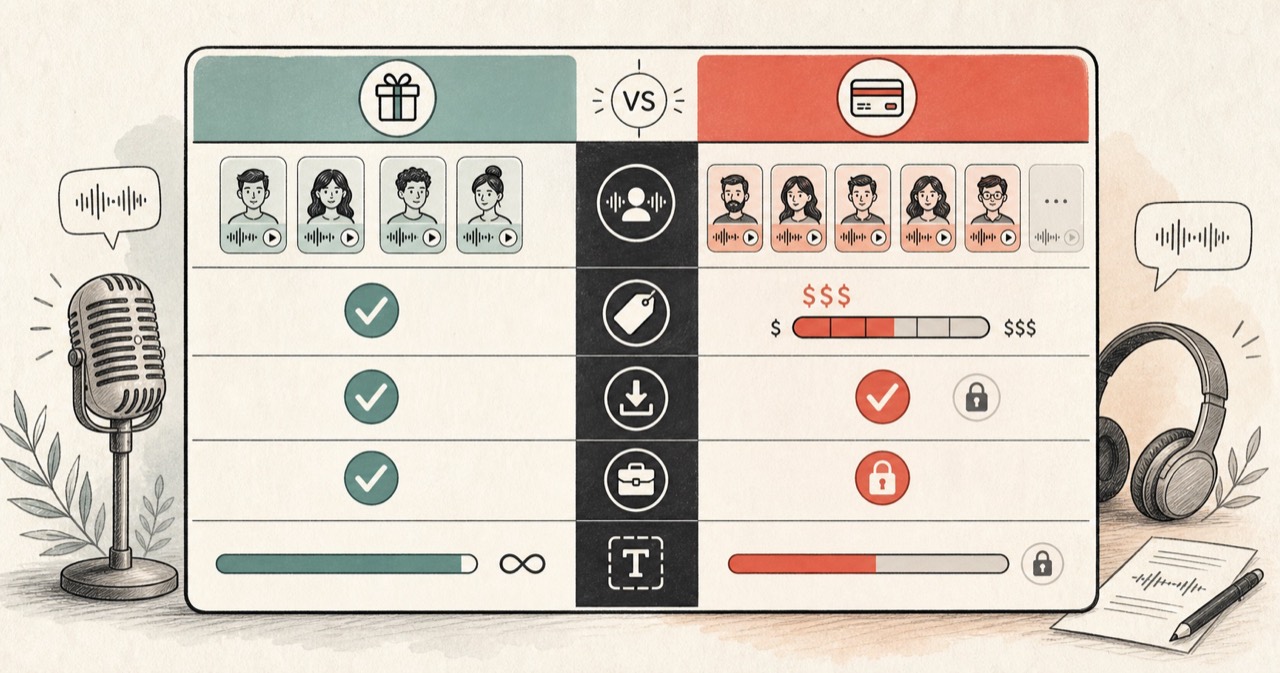
Short answer: Speechify is the better choice if you need a polished mobile app that reads PDFs and web pages live while you go about your day. FreeTextoSpeech is the better choice if you need downloadable AI voiceovers for content creation, courses, or offline listening — especially on a budget. The two tools solve adjacent problems, not the same problem. Below, an honest breakdown of where each fits.
Disclosure upfront
This is a comparison written by the FreeTextoSpeech team. We have tried to be fair — we recommend Speechify for specific use cases below where it is genuinely the better tool. Voice quality, pricing, and feature differences are described as accurately as possible. If you find an error, let us know via the contact page.
The one-line summary of each tool
Speechify is a reading app. You point it at a PDF, web page, or document and it reads live to you. Its mobile apps (iOS and Android) are the core of the product, and the browser extension lets you highlight text on any webpage and hear it read aloud.
FreeTextoSpeech is a voiceover generator. You paste text and download an audio file. It is a website with a single purpose: turn text into a downloadable WAV. No mobile app, no browser extension, no live reading.
This distinction matters more than most comparison articles acknowledge. If your workflow is “read a PDF while walking the dog,” Speechify fits better. If your workflow is “generate a voiceover for my YouTube video,” FreeTextoSpeech fits better.
Price
| Plan | Speechify | FreeTextoSpeech |
|---|---|---|
| Free tier | Basic voices, limited daily usage | Everything, no limits |
| Premium | ~$139 / year | — |
| Enterprise | Contact sales | — |
Speechify’s free tier gives you access to the app but gates the most natural voices behind Premium. FreeTextoSpeech has no paid tier — the 54 voices and all features are available on the free tier, which is the only tier.
If money is a constraint — and for many students, accessibility users, and side-project creators it is — this is the decisive difference.
Voice quality and count
Speechify Premium includes around 30+ natural voices across 20+ languages, plus celebrity voices that you can license separately (Snoop Dogg, Gwyneth Paltrow, and others in past campaigns). The celebrity voices are a real draw for some creators.
FreeTextoSpeech has 54 voices across 9 languages. No celebrity voices. The underlying model (Kokoro) produces natural narration that is competitive with Speechify Premium for standard use cases — narration, explainer content, audio versions of articles — without matching Speechify’s top-end expressiveness or the celebrity novelty.
Verdict: For language coverage breadth, Speechify wins. For raw voice count in the major languages creators actually use, FreeTextoSpeech is competitive. For celebrity voices, only Speechify offers them.
Commercial use
Speechify’s commercial use rights vary by tier. Generally, the free tier excludes commercial use; the Premium tier allows it within the spirit of individual creator projects; enterprise or high-volume commercial use often requires a separate license.
FreeTextoSpeech allows commercial use on the free tier explicitly. You can use the audio in monetized YouTube videos, podcasts, ads, paid courses, apps, and client work without attribution and without paying.
Verdict: FreeTextoSpeech wins for commercial creators, especially high-volume ones.
Mobile experience
Speechify has a polished, mature mobile app on both iOS and Android. It integrates with your phone’s document picker, reads PDFs, EPUBs, and web articles live, and syncs your listening position across devices. For users whose primary reading mode is mobile-while-moving, this is the product.
FreeTextoSpeech is a website. It works on mobile browsers and generates audio that plays natively on any device, but there is no dedicated app. For workflows where you want to download a WAV and listen later, mobile browser access is enough. For workflows where you want live reading, Speechify is the clear winner.
Verdict: Speechify wins for live mobile reading. FreeTextoSpeech is sufficient for offline listening via generated WAVs.
PDF and document reading
Speechify reads PDFs, DOCX files, EPUB files, and web pages directly. You point it at the file and it plays.
FreeTextoSpeech does not open documents. You extract the text yourself (copy-paste or OCR) and paste it into the tool. This is an extra step, but for text-selectable PDFs it takes about 10 seconds. For long documents you can generate chunks and stitch them.
Verdict: Speechify wins for convenience with documents. FreeTextoSpeech is workable if you are willing to extract text yourself.
Browser extension
Speechify’s Chrome extension highlights any paragraph on any webpage and reads it to you. This is excellent for reading long articles in place.
FreeTextoSpeech has no extension. For reading a single article, you copy-paste the text into the site. For regular use, the extra step becomes tedious.
Verdict: Speechify wins for reading web pages in place.
Privacy and data
Speechify requires an account, processes text through cloud services, and stores listening history for cross-device sync. Standard for the category.
FreeTextoSpeech requires no account. Text is processed by the backend for generation and not stored. No user profile exists, so there is nothing to leak if the service were compromised.
Verdict: FreeTextoSpeech wins for privacy-conscious users.
Feature-by-feature summary
| Feature | Speechify | FreeTextoSpeech |
|---|---|---|
| Price (full features) | ~$139 / year | Free |
| Voices | 30+ natural (paid) | 54 natural (free) |
| Languages | 20+ | 9 |
| Mobile app | Yes (polished) | No (browser only) |
| Live PDF reading | Yes | No (paste text) |
| Browser extension | Yes | No |
| Audio download | Paid tier | Free (WAV) |
| Commercial use | Paid tier | Free |
| Signup required | Yes | No |
| Celebrity voices | Some (licensed) | No |
| Screen reader integration | Partial | N/A |
When to pick which
Pick Speechify if:
- You read a lot of PDFs, emails, or articles on mobile and want live playback.
- You use a reader for accessibility and want the mobile-first experience.
- You want celebrity voices for novelty.
- You are happy paying for a polished product.
Pick FreeTextoSpeech if:
- You generate audio for content creation (YouTube, TikTok, courses, podcasts).
- You need downloadable WAVs that you own.
- You want commercial-use rights without a subscription.
- You cannot afford a paid tool or are supporting users who cannot.
- You value privacy and want to avoid account creation.
Can you use both?
Yes, and many users do. Speechify for daily mobile reading, FreeTextoSpeech for content creation voiceovers. The two workflows do not conflict.
Try FreeTextoSpeech
If you came here comparing because Speechify’s Premium cost is a blocker, or because you specifically need downloadable voiceovers, open FreeTextoSpeech and try a clip. It takes about 30 seconds end-to-end, and there is nothing to install or sign up for. Most users can tell within one generation whether it fits their workflow.
Learn more about the 54 voices and 9 supported languages, or browse our landing pages for specific use cases.